
This article is based on a LeverX technical masterclass by Viktoryia Ryzhkouskaya, Senior ABAP Developer. It explores the practical implementation of SAP Process Test Framework (PTF), covering custom BOPF integration, reusable actions and lessons learned from building more than 80 automated regression test scripts.
Why End-to-End Testing Still Fails on SAP Projects
If you're working with BOPF or RAP, you've probably seen transports where every ABAP Unit test passes, yet the business process still breaks after deployment. The issue is rarely the method you've changed. It's usually somewhere later in the document flow: a follow-up API, a status transition or an integration point that only becomes visible when the entire process is executed.
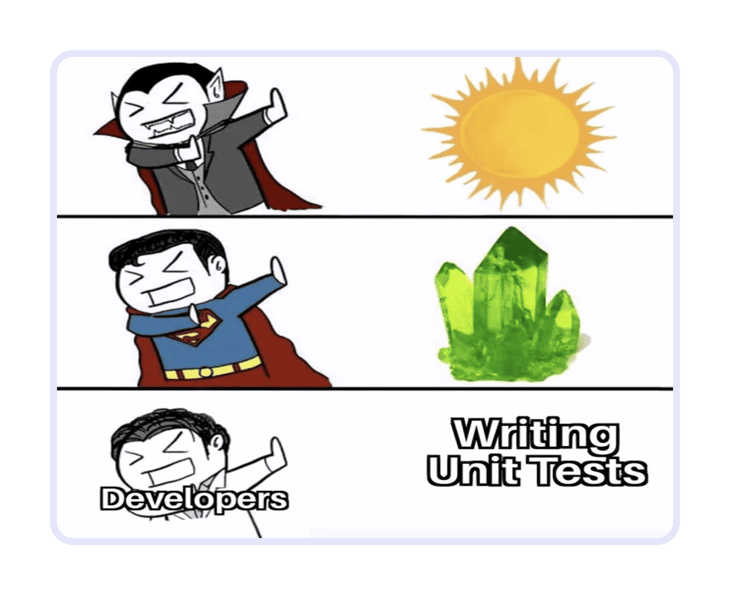
This was exactly the challenge Viktoryia Ryzhkouskaya described during the LeverX masterclass. Her team consistently covered new functionality with ABAP Unit tests, but customer incidents still appeared because the tests validated individual code units rather than complete business scenarios.
Manual regression testing catches many of these issues, but it doesn't scale well. A typical regression scenario often requires you to:
- prepare consistent master data;
- create prerequisite business documents;
- execute several transactions or Fiori applications;
- verify every intermediate result before continuing.
Repeating the same workflow after every transport quickly becomes one of the most time-consuming parts of the release cycle. During the masterclass, Viktoryia compared this with Process Test Framework, where the same end-to-end scenario can often be executed in 20-30 seconds instead of roughly 10 minutes through the UI.
The problem isn't the ABAP Unit itself. While unit tests verify whether your implementation works, regression testing verifies whether the business process still works. SAP Process Test Framework was built to automate that second layer.
Where Process Test Framework Fits in Your Testing Strategy
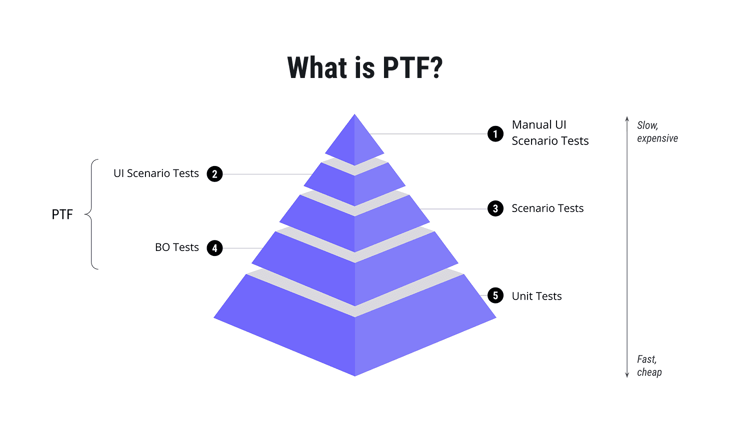
One of the most common misconceptions about PTF is that it's intended to replace ABAP Unit. In reality, the two frameworks complement one another because they answer different questions.
| Testing approach | Primary goal |
| ABAP Unit | Verify that individual methods and business logic behave correctly. |
| UI and manual testing | Verify that users can complete a business process through the application. |
| SAP Process Test Framework | Verify that the business process itself still works by executing backend actions directly. |
Instead of choosing one approach over another, it's more useful to think of them as different layers of the same testing strategy.
ABAP Unit provides immediate feedback while you're developing. While manual testing validates the complete user experience but requires significant effort to repeat, Process Test Framework sits between those two layers. It executes backend business scenarios without relying on the user interface, giving developers realistic regression coverage while keeping execution fast enough to become part of everyday development.
This positioning was one of the central ideas of the masterclass and explains why PTF is particularly valuable for document-driven applications involving Transportation Management, Logistics or other processes spanning multiple Business Objects and APIs.
Example: Manual Regression vs. PTF
Imagine a regression scenario that requires you to:
- create a Purchase Order;
- generate Transportation Management documents;
- assign the generated objects;
- validate the final business document.
Executing that process manually may take ten minutes or longer, even for someone familiar with the application. A PTF script performs exactly the same backend operations in approximately twenty to thirty seconds while using the same input data every time it's executed. That consistency is what makes the framework especially effective for regression testing, where the goal is to repeat the same business scenario after every significant change.
What Makes SAP Process Test Framework Different?
The defining characteristic of Process Test Framework is that it executes real business processes using real business data.
Every PTF script creates, modifies and validates actual business documents inside the SAP system. If a script creates a Purchase Order, Freight Order or Consignment Order, that document exists in the database after execution exactly as if it had been created through the application itself. This gives developers two significant advantages.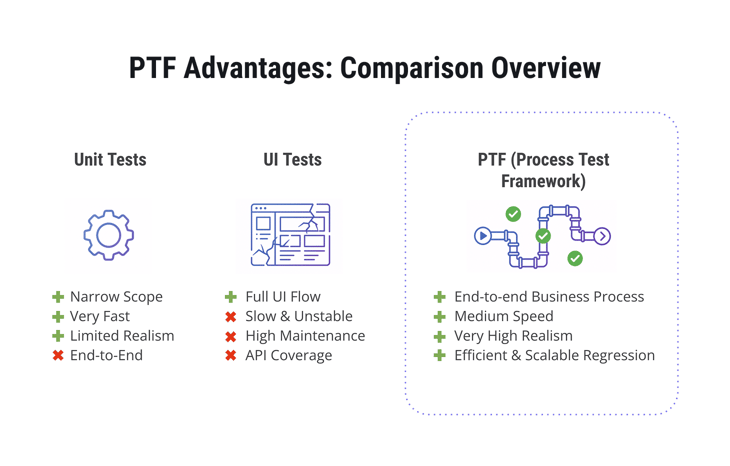
First, regression tests execute the same backend logic used in production, allowing them to validate complete business processes rather than isolated methods.
Second, failures become much easier to investigate.
Example: Debugging a Failed PTF Script
Let us intentionally execute a script with an incorrect check variant.
The framework immediately stops at the failing validation step, highlighting the field that differed from the expected value and preserving the generated business document for analysis.
Instead of reconstructing the scenario manually, the developer could immediately:
- open the generated Consignment Order;
- inspect its document flow;
- compare expected and actual values;
- continue debugging using the real business document created during the test.
That workflow is fundamentally different from debugging mocked objects inside a unit test. PTF actually executes the business process, making every generated document available for further investigation whenever something goes wrong.
Finally, once a business scenario has been modelled, it becomes a reusable regression asset. The same script can be executed after every transport or release using identical input data, providing consistent validation without repeating the same manual UI steps. As regression suites grow, that repeatability becomes one of the framework's biggest strengths.
How a PTF Script Works
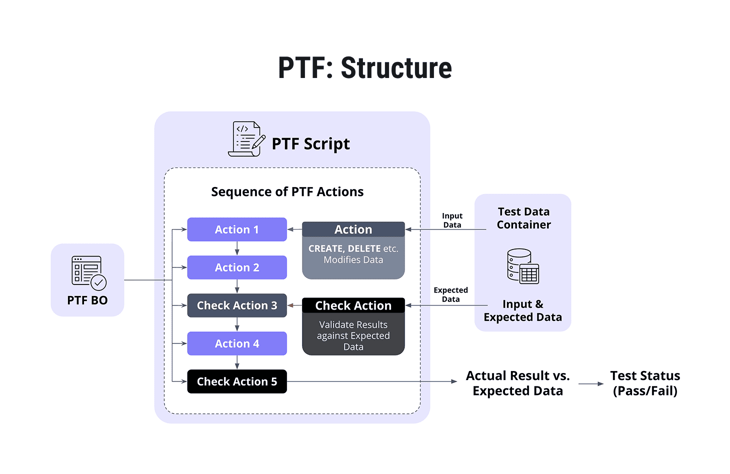
One of the reasons PTF is relatively easy to adopt is that its execution model is straightforward. A script is simply a sequence of actions that manipulate business data and validate the result. Instead of driving the UI, the framework executes backend logic directly, allowing you to recreate complete business processes with consistent input data.
The building blocks are simple on their own, but together they allow you to model surprisingly complex scenarios.
PTF Business Objects: A Catalog of Available Actions
The first concept that often causes confusion is the PTF Business Object. Despite the name, it has nothing to do with a BOPF Business Object.
A PTF Business Object is better thought of as a catalog. It groups together all actions that belong to a particular business process or document type and makes them available inside PTF scripts. A single script can reference multiple PTF Business Objects, which allows one regression scenario to span several applications or integration points such as Business Objects for Purchase Documents, Freight Orders, and Consignment Orders.
Actions: The Building Blocks of Every Script
Every PTF script is composed of actions. Some actions modify business data, while others validate the results.
In practice, you'll work with two categories:
- Business actions, which create, update or delete business documents.
- Check actions, which compare the actual result of the process against the expected outcome.
This separation keeps scripts modular. The same document creation action can be reused across dozens of regression scenarios, while different check actions validate different aspects of the resulting business object.
For example, one script might verify that a Consignment Order was created successfully, while another uses exactly the same creation action but checks whether the resulting Delivery received the correct status.
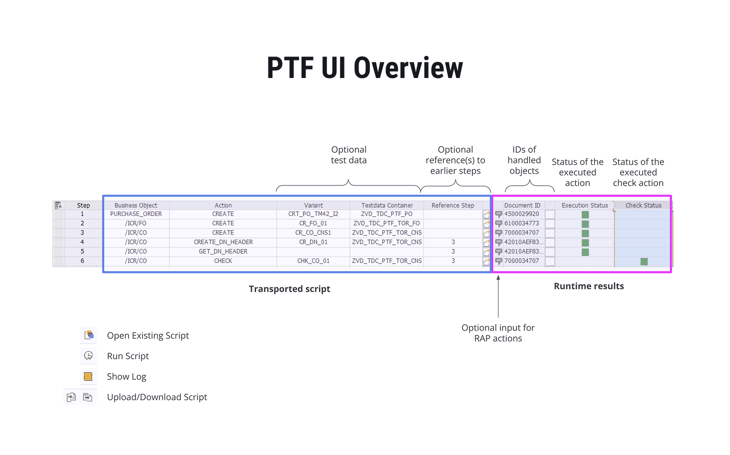
Reference Steps: Passing Documents Between Actions
Business processes rarely consist of isolated operations. If one step creates a document, the next step usually needs to continue working with it.
PTF solves this with Reference Steps.
Instead of passing document numbers manually, every action can reference the output of one or more previous steps. The framework stores the generated document IDs and makes them available to subsequent actions.
A simplified process might look like this:
Step 1 → Create Purchase Order
↓
Step 2 → Create Delivery
↓
Step 3 → Create Freight Unit
↓
Step 4 → Validate Document Flow
Each step simply references the document produced earlier. If an action requires multiple objects – for example, a document together with its predecessor – you can define multiple reference steps within the same script.
Example: Retrieving a Document from a Previous Step
Inside a custom PTF action, retrieving a document created earlier is surprisingly simple. The framework exposes the output of previous steps through the run environment.
Every action that depends on previously created business objects follows this pattern. Rather than hardcoding document IDs or creating additional lookup logic, the action simply retrieves the output of the referenced step and continues processing the same business object.
Best Practice: Keep your actions independent of specific document numbers. Let the framework manage references between steps. This makes scripts reusable and avoids unnecessary setup logic.
Test Data Containers: Reuse Instead of Repetition
If Reference Steps connect actions together, Test Data Containers (TDCs) provide the information those actions need to execute.
Instead of embedding values directly inside every script, PTF retrieves input parameters from reusable Test Data Container variants maintained in SECATT. The same action can therefore be executed with different document types, vendors or business scenarios simply by selecting another variant.
Test Data Containers can be used in two different ways:
- as input data for business actions such as document creation or status changes;
- as expected data for check actions.
That distinction is important because it allows the same framework mechanism to support both execution and validation.
Example: Reading Input Data from a Test Data Container
Retrieving a Test Data Container inside a custom action requires only a single utility call.
After the data has been loaded, the action simply passes it to the underlying API.
In the demonstration, a Consignment Order creation action retrieved the required document type from its Test Data Container and forwarded that value directly to the business API responsible for creating the document. The implementation itself remained unchanged regardless of which document type the regression scenario required. Only the selected Test Data Container variant changed.
Check Actions: Validate Only What Matters
A common mistake in automated testing is comparing entire business objects when only a small part of the result actually matters. If you're verifying that a status changed correctly, maintaining expected values for fifty unrelated fields only increases maintenance effort.
PTF avoids this problem.
A Test Data Container used by a check action contains two datasets:
- the expected business data;
- a separate structure identifying which fields should actually be compared.
During execution, the framework ignores every unmarked field and validates only the ones explicitly selected by the developer. If the scenario only needs to verify that the Delivery Type equals 01, that's the only comparison that takes place.
Example: Debugging a Failed Check
The live demonstration intentionally used an incorrect Test Data Container variant to show how failed validations are reported.
When the check action encountered a mismatch, PTF:
- stopped execution immediately;
- highlighted the failing step;
- identified the field whose value differed from the expected result;
- preserved the generated business document for further analysis.
Instead of recreating the scenario manually, the developer could immediately open the generated Consignment Order, inspect its document flow and continue debugging using real business data. That's a significantly more practical workflow than analysing mocked objects or repeating an entire UI scenario just to reproduce the same issue.
Making Your Own BOPF Developments Available in PTF
Understanding how PTF scripts work is only half the story. The next step is integrating your own developments into the framework so they can participate in automated regression testing.
This was exactly the challenge Viktoryia's team faced. Their project extended standard BOPF Business Objects with custom actions that supported their own application. Those actions were already covered by ABAP Unit tests, but they still wanted to validate complete business scenarios through PTF. To achieve that, the framework first had to understand which Business Objects and actions were available and how they should be executed.
Although the implementation involves several configuration steps, the overall workflow is surprisingly structured.
Step 1. Register a PTF Business Object
The first step is creating a PTF Business Object, which acts as the entry point for all actions related to a particular business process.
This registration is maintained in the PTFBO database table.
The registration itself is minimal. It mainly consists of:
- the name of the PTF Business Object;
- the implementation class responsible for executing its actions.
That implementation class inherits from CL_PTF_BO and becomes the bridge between the PTF framework and your own application logic. Every action executed by the framework eventually ends up calling methods implemented inside this class.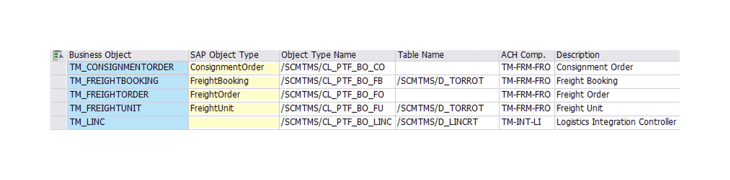
Implementation Note: Although the name suggests otherwise, a PTF Business Object is not a BOPF Business Object. Think of it as a registry that exposes your application's available actions to the framework.
Step 2. Register the Available Actions
Once the Business Object exists, the next step is defining which actions belong to it.
This configuration is stored in PTFBOA, where every available action is registered together with its metadata.
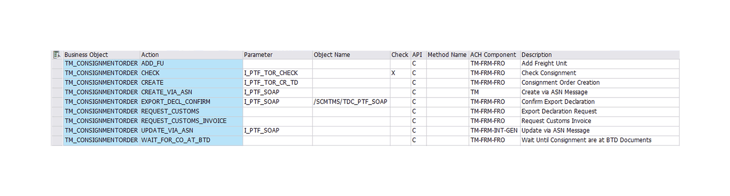
Depending on your scenario, actions can:
- create business documents;
- modify existing documents;
- change statuses;
- execute custom APIs;
- validate business data.
Each action may also define which Test Data Container parameter it expects as input. For example, a document creation action might expect a structure containing the document type, while a validation action expects a structure containing the values it should compare against the generated document.
The framework also distinguishes between regular actions and check actions. When registering a validation action, remember to mark it accordingly. Otherwise, PTF will treat it as a normal execution step rather than a validation step.
Interestingly, the configuration table also stores additional information such as the owning SAP component. While this metadata doesn't influence execution directly, it becomes useful when a standard action fails and an incident needs to be forwarded to the responsible development team. During the presentation, Viktoryia pointed out that this small detail can save time when working with a mixture of standard SAP and custom actions.
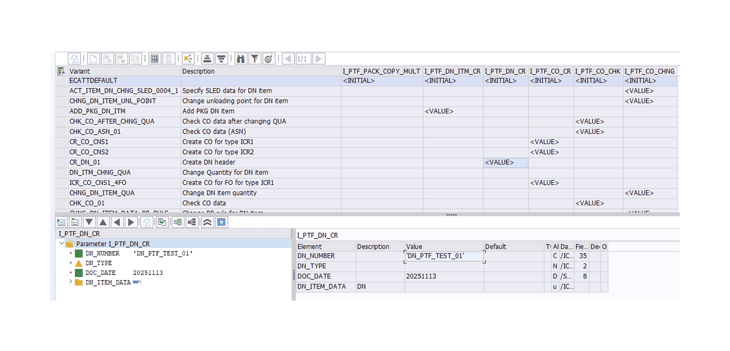
Step 3. Prepare Test Data Containers
With the execution model in place, the next task is preparing reusable Test Data Container variants. This is where most of the flexibility comes from.
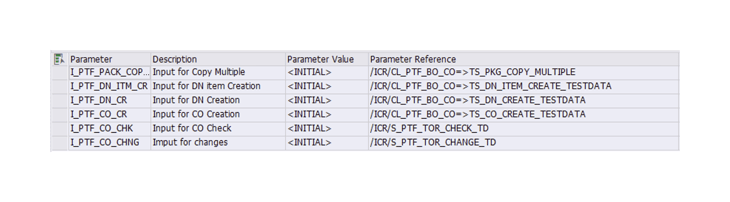
Rather than hardcoding values into individual scripts, you define reusable variants that provide:
- input parameters for business actions;
- expected results for check actions.
A single action implementation can therefore support multiple business scenarios simply by referencing another variant.
Step 4. Implement the Action Logic
Once configuration is complete, the implementation itself becomes fairly repetitive.
Every custom PTF action typically follows the same sequence:
- Retrieve input data from the Test Data Container.
- Retrieve any referenced business documents created earlier in the script.
- Execute the business API.
- Save the transaction.
- Return the generated document ID.
Most actions differ only in the API they invoke.
During the demonstration, Viktoryia used a Consignment Order creation action as an example. The action first retrieved its input data from the assigned Test Data Container, extracted the required document type and passed it to the underlying API. After successfully creating the document, it committed the transaction and exported the generated document number back to the framework, allowing later script steps to continue working with the same business object.
Best Practice: Always save your changes before finishing a PTF action. Later steps often depend on documents created earlier in the script, so persisting the transaction is essential. Viktoryia explicitly highlighted this as the one implementation detail developers should never overlook.
RAP Business Objects Require Less Configuration
Although the masterclass focuses primarily on BOPF, PTF also supports RAP applications. The main advantage is that RAP eliminates much of the registration work: instead of defining custom PTF Business Objects and actions, you can select a RAP Business Object directly and provide input parameters through the built-in JSON editor.
During the demo, Viktoryia used this approach to create Delivery Nodes from a previously created Purchase Document, with the action referencing earlier script steps just as in a BOPF-based scenario.
Lessons Learned from Building More Than 80 Regression Scripts
According to Viktoryia, the team spent roughly two months integrating PTF into their application and ultimately built more than 80 automated regression scripts covering real business scenarios.
The project highlighted three key takeaways:
- Expect an upfront investment. Registering Business Objects, implementing reusable actions and preparing Test Data Containers takes time, but it establishes the foundation for future automation.
- Design for reuse. Actions, check methods and Test Data Container variants can be combined across multiple scenarios, making new regression tests much faster to build.
- Debugging becomes easier. Because every script creates real business documents, failures can be investigated directly from the generated Purchase Order, Delivery or Consignment Order instead of mocked test data.
Ultimately, PTF turns regression testing from a repetitive manual task into a reusable suite of executable business scenarios.
Best Practices for Building Maintainable PTF Scripts
The long-term value of PTF comes from building reusable components rather than individual scripts. Based on the implementation presented during the masterclass, the following practices help keep regression suites scalable:
- Keep actions focused. Each action should perform a single business operation, making it easier to reuse and debug.
- Test business processes, not APIs. Build scripts around complete document flows instead of individual backend calls.
- Reuse Test Data Containers. Maintain reusable variants for common business scenarios instead of creating new input data for every script.
- Validate only the fields that matter. Compare only the values relevant to the scenario to reduce maintenance and avoid unnecessary failures.
- Always save changes before returning. Subsequent actions rely on documents created in previous steps, so persisting changes is essential for the script to continue correctly.
Current Limitations of SAP Process Test Framework
Before introducing PTF on your project, keep a few limitations in mind:
- The implementation examples in this article are based primarily on BOPF developments. Although PTF also supports RAP, some implementation details differ.
- PTF is still evolving. SAP continues to enhance the framework, so features and implementation details may change over time.
- Availability depends on your SAP landscape. At the time of the masterclass, PTF was available in SAP standard development and test systems, so it's worth confirming support in your own environment before planning adoption.
These aren't drawbacks so much as implementation considerations, but they're worth evaluating before investing in a larger PTF regression suite.
When Should You Use PTF?
PTF isn't a replacement for ABAP Unit because it covers a different layer of testing.
Use ABAP Unit to validate isolated business logic, calculations and class behaviour.
Use SAP Process Test Framework to validate:
- end-to-end business processes;
- document lifecycles;
- integrations between SAP components;
- regression scenarios executed after code changes;
- custom BOPF or RAP developments.
In practice, the two frameworks work best together: ABAP Unit protects your implementation, while PTF verifies that the complete business process still works after your change.
Share this article



.png)
.png)
.png)
.png)
.png)