.png)
Anton Martynenko, a Java backend developer with deep SAP CAP experience at LeverX, shares field-tested insights from years of building enterprise APIs with Spring Boot and OData.
After years of building REST APIs the “classic” way, most teams hit the same brick wall sooner or later. REST sounds simple on paper, yet enforcing it consistently across teams is another story altogether.
This is exactly where the SAP Cloud Application Programming Model (CAP) steps in. Instead of treating REST as a loose convention, SAP CAP and OData turn it into a protocol with teeth. But in this article, I won’t sell you SAP CAP as a silver bullet.
Drawing on years of enterprise delivery experience in Java and SAP environments, I’ll explain what SAP CAP is, why enterprises are betting on it, how it compares to traditional approaches, and where its limits lie.
Key Takeaways
-
CAP provides a lot of functionality out of the box, but it requires you to accept a higher level of abstraction and less low-level control.
-
OData is powerful and consistent, but it can feel verbose, especially to developers used to simpler JSON-based APIs and bandwidth-sensitive systems.
-
For small, non–data-centric microservices, CAP may be excessive. However, for enterprise, data-driven applications, especially in SAP-centric environments, it is a very strong choice.
Common Problems with Traditional REST APIs
If you’ve worked with a SAP REST API or any large REST-based system, this may sound familiar:
-
First, development slows down because every new resource requires a lot of boilerplate (entities, DTOs, repositories, services, mappers, validators). Sometimes we can abstract it, but not always.
-
Second, architectural boundaries are often violated. Business logic appears in almost every layer, making the system harder to reason about and maintain.
-
In addition, you constantly have to monitor REST style. Our developers introduced RPC-like endpoints, misused HTTP methods, and applied inconsistent error codes.
-
From a consumer’s perspective, APIs behaved unpredictably: one resource returned only 400 and 500 errors, while another used a full range of status codes, simply because different developers made different choices.
-
On top of that, you can face N+1 query problems and the usual lazy-vs-eager fetching decisions.
The root cause is simple: REST is treated as a recommendation, not a rule. And anything that isn’t enforced, well, you know how that ends. It eventually gets ignored. But that changed for me when I joined an SAP project and encountered OData and SAP CAP.
What Is SAP CAP and Why Should You Care?
At its core, the SAP Cloud Application Programming Model (CAP) is a model-driven framework for building enterprise-grade services. The SAP CAP framework revolves around Core Data Services (CDS), which define your data model, service contracts, and API behavior in one coherent layer.
While REST is based on vague principles, SAP CAP implements a full-fledged protocol called OData. It changes everything. Suddenly, everyone plays by the same rules, and the API becomes predictable. This was exactly what I was looking for.
Was it love at first sight? Almost. CAP is powerful, but it’s also opinionated and unapologetically SAP-centric. Still, for data-heavy enterprise systems, that trade-off often makes sense.
Pros and Cons of SAP CAP
What SAP CAP does well?
If you’re coming from Spring Boot, CAP will feel familiar, yet different. Key strengths of SAP CAP development include:
-
API-first and data-centric design.
-
Native support for OData, metadata, and OpenAPI.
-
Seamless local development with SQLite and H2.
-
Clean separation between generated and custom code.
-
Hooks for validation, security, enrichment, and custom logic via handlers.
This makes SAP CAP programming particularly effective for enterprise-grade APIs that need consistency from day one.
What are the limitations of CAP?
That said, CAP isn’t a universal hammer. Limitations include:
-
Tight coupling to SAP ecosystems (HANA, PostgreSQL, SAP tooling).
-
Weak support for streaming and binary data.
-
If your architecture depends on NoSQL, multi-cloud databases, or ultra-lightweight microservices, CAP may feel like overkill.
Another important characteristic of CAP is that it is declarative. Most of the application behavior is defined in declarative documents. If you need very low-level control, a more generic framework may be a better choice. This brings us to OData.
What is OData?
What matters most is that OData is a protocol. Everyone follows the same rules, and breaking its REST-based semantics becomes much harder.
Is OData better than GraphQL? Compared to GraphQL, it’s less flexible, but it still offers significant bandwidth savings, which is especially important for mobile clients.
Out of the box, OData provides filtering, sorting, pagination, expansion, projection, counting, and more. OData is already widely used. Tools like Power BI, Excel, and SAP Gateway rely heavily on it.
At first glance, OData URLs can look intimidating. However, these URLs are meant to be machine-generated and machine-readable. Once you break them down step by step, the structure becomes clear and intuitive, especially if you think in SQL-like terms.
What are the disadvantages of OData?
The biggest drawback of OData is verbosity. OData is often too heavy for light microservice architectures, IoT, or bandwidth-sensitive mobile applications. In such scenarios, we have a lot of alternatives that may be a better fit. Additionally, CAP’s limited official database support can be a constraint.
What Does the OData Protocol Provide?
With OData, you get powerful features out of the box with the following functions:
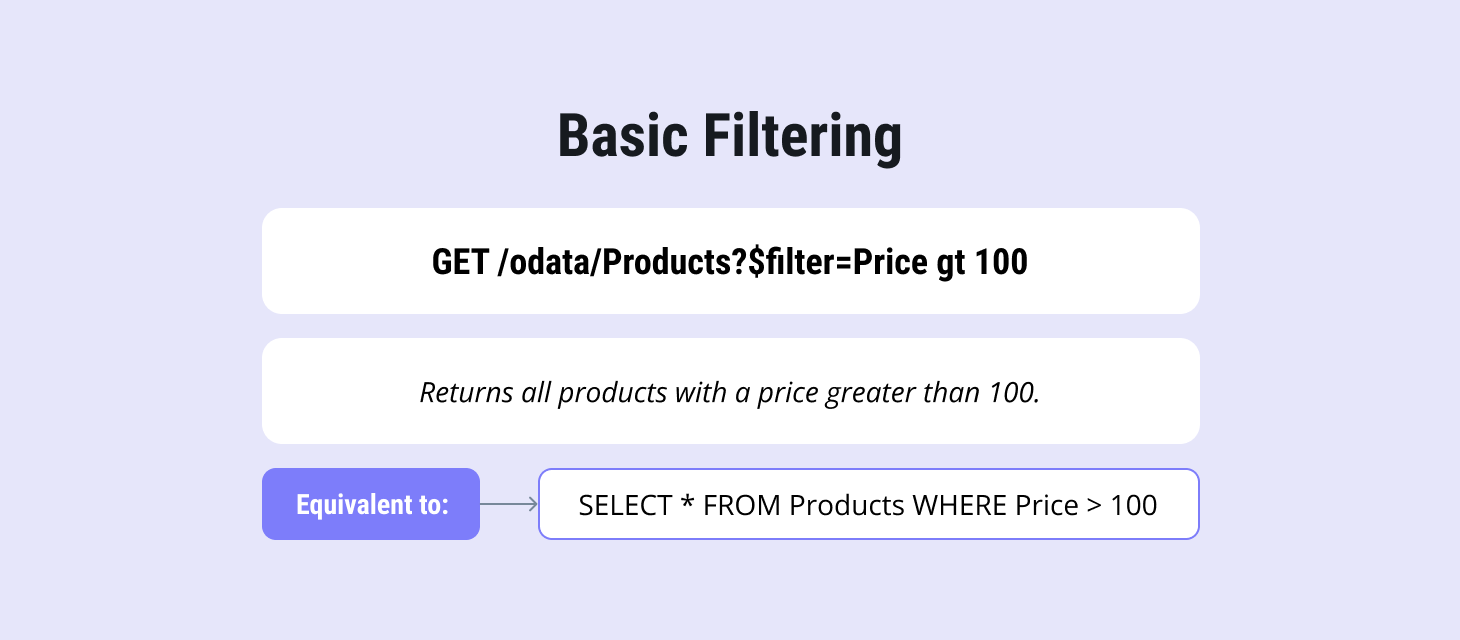
Basic filtering
It is quite intuitive and understandable what's going on here. We can get everything by analogy with SQL.
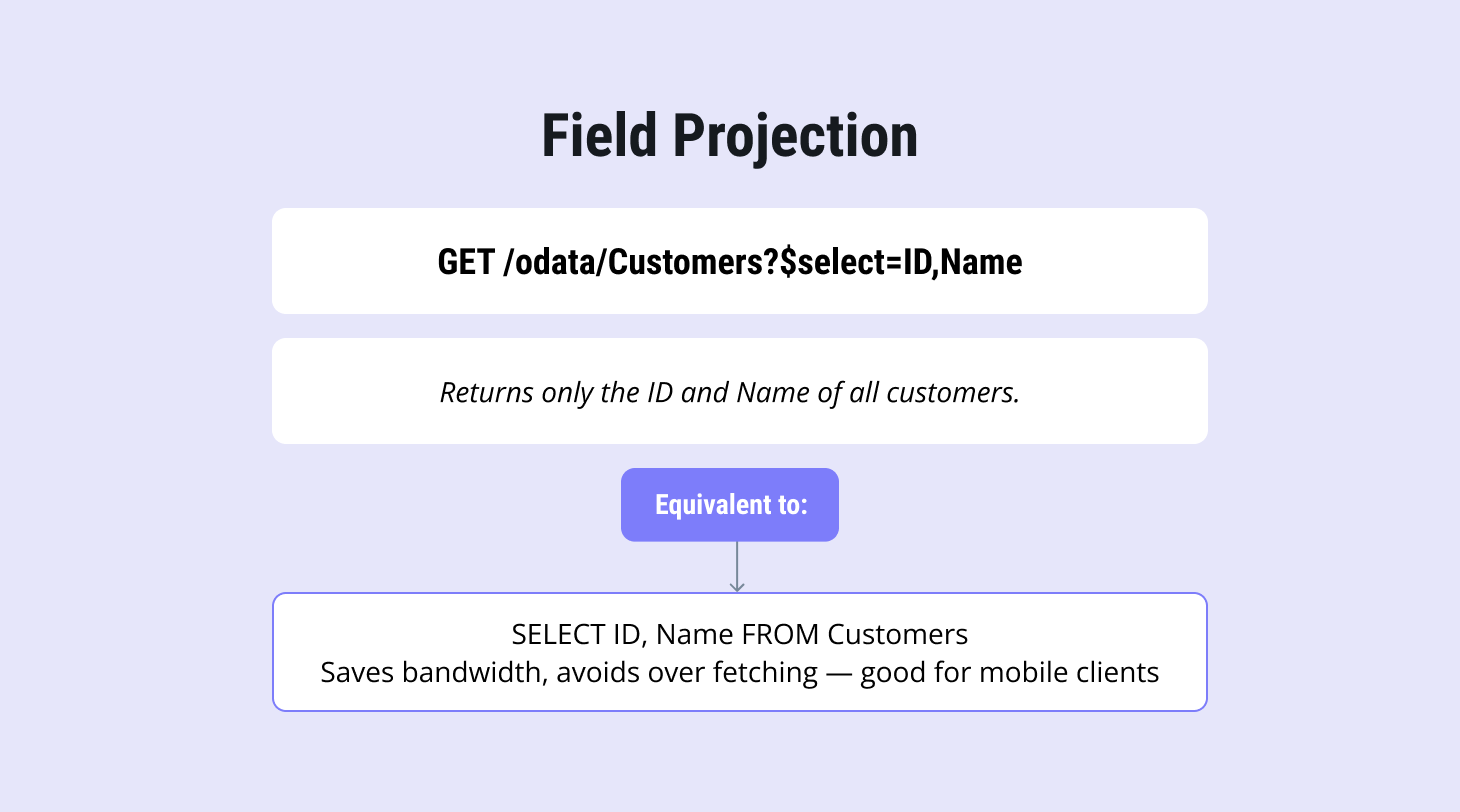
Field projections
They are often overlooked, especially in mobile development, where bandwidth matters. While they’re not as powerful as GraphQL, they still help reduce payload size by returning only the fields a client actually needs.
Expanding related data (joins)
You can extend dependencies down to the query level, which means data is fetched only when it’s actually needed. From my perspective, that feels almost like magic. And yes, no more decisions on the N+1 topic.
.png?width=1460&height=766&name=Expand%20(Join%20Data).png)
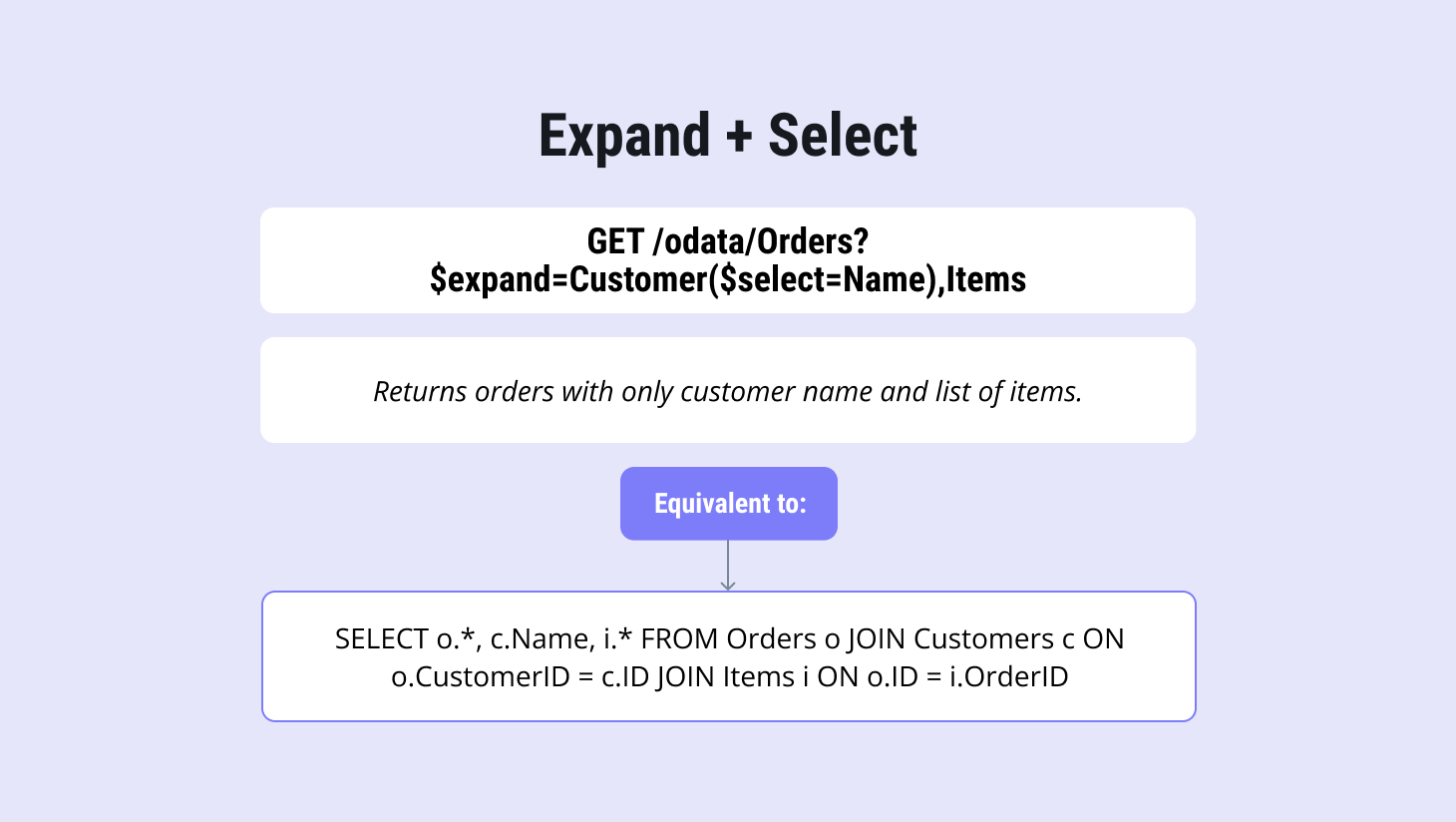
Combining Expand and Select
You can specify exactly which fields to retrieve from a dependency through the query.
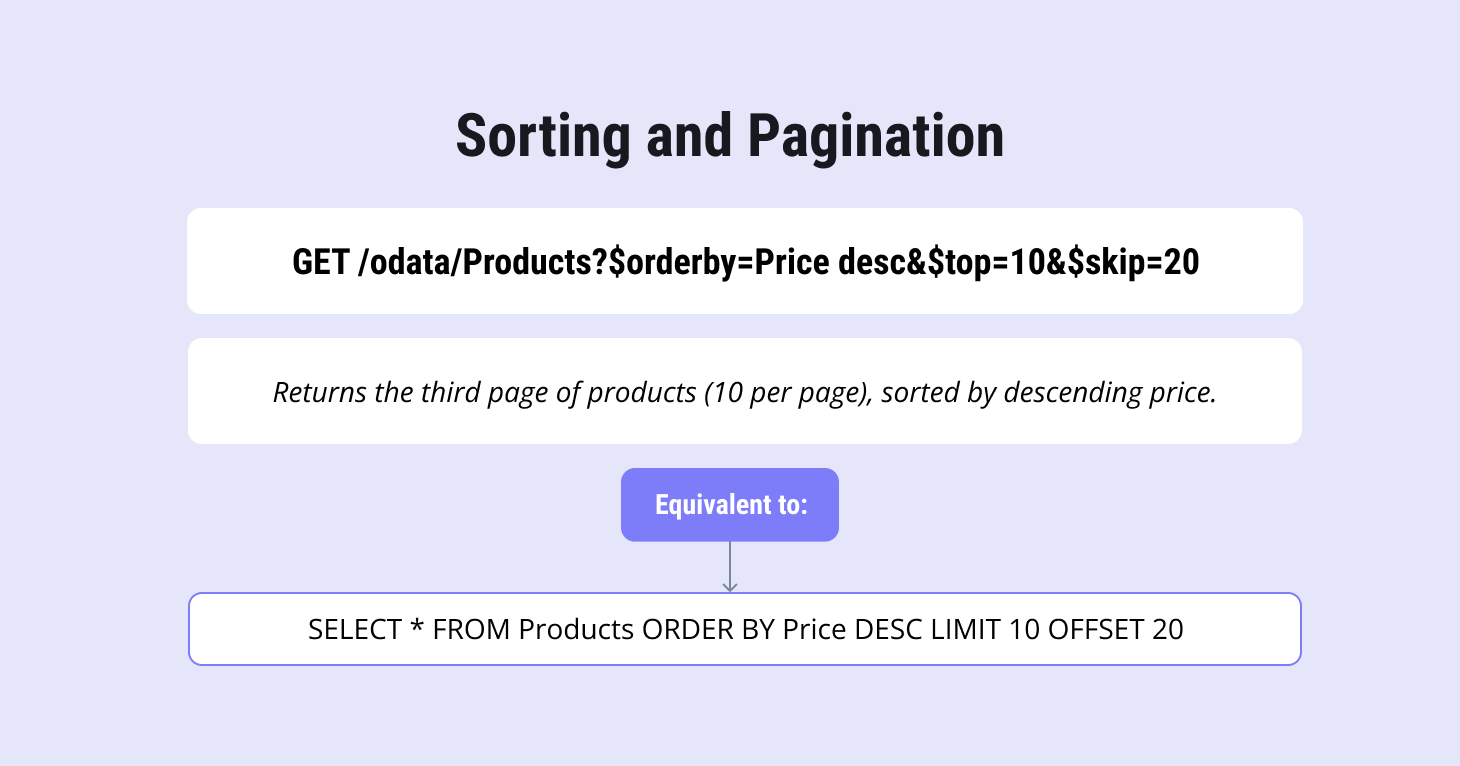
Sorting and pagination
They are available out of the box.
Filtering on Expanded Entities
One particularly useful feature is the ability to filter on expanded properties, including string-based filters with wildcards.
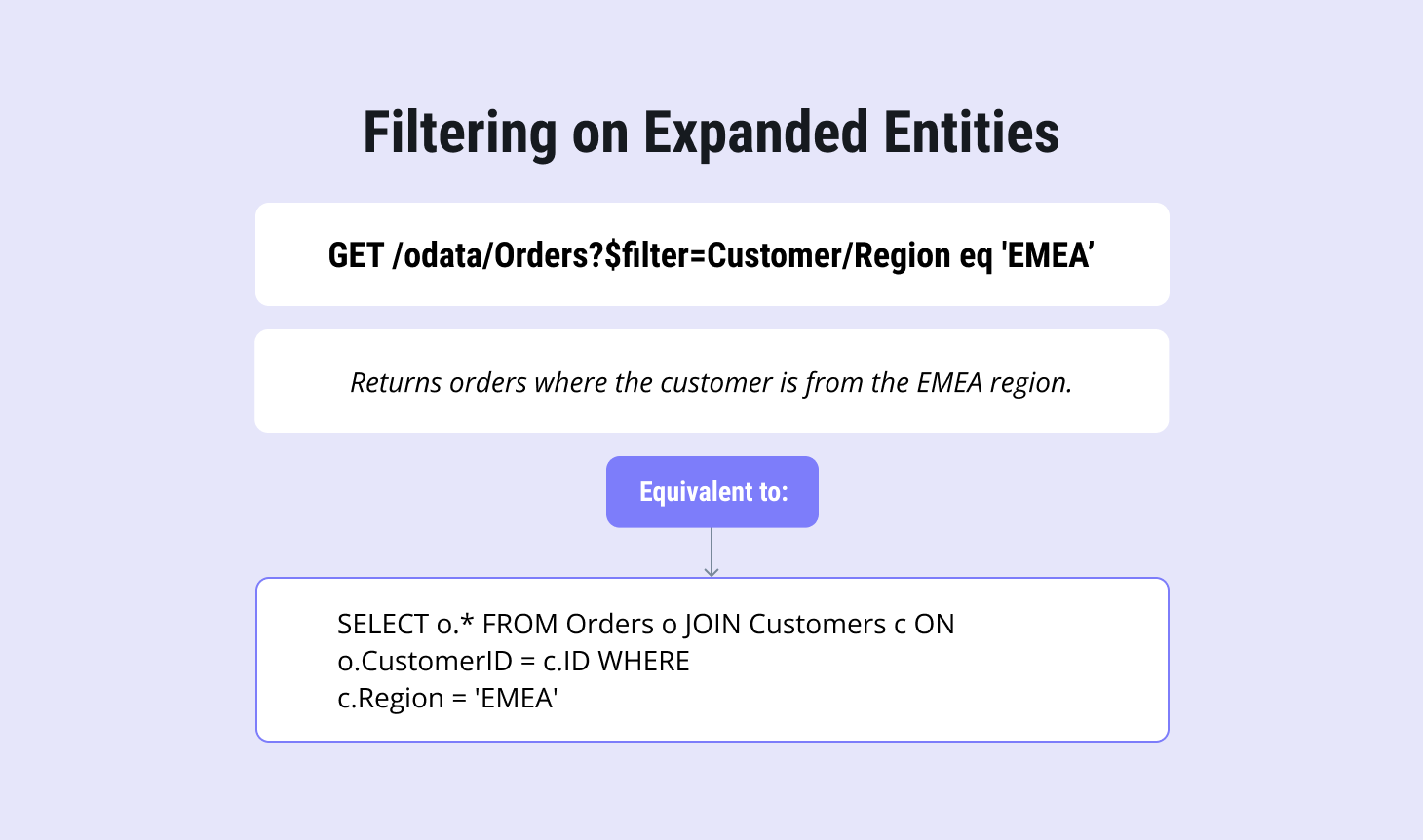
In CAP, data extensions beyond standard REST principles are handled through functions and actions.
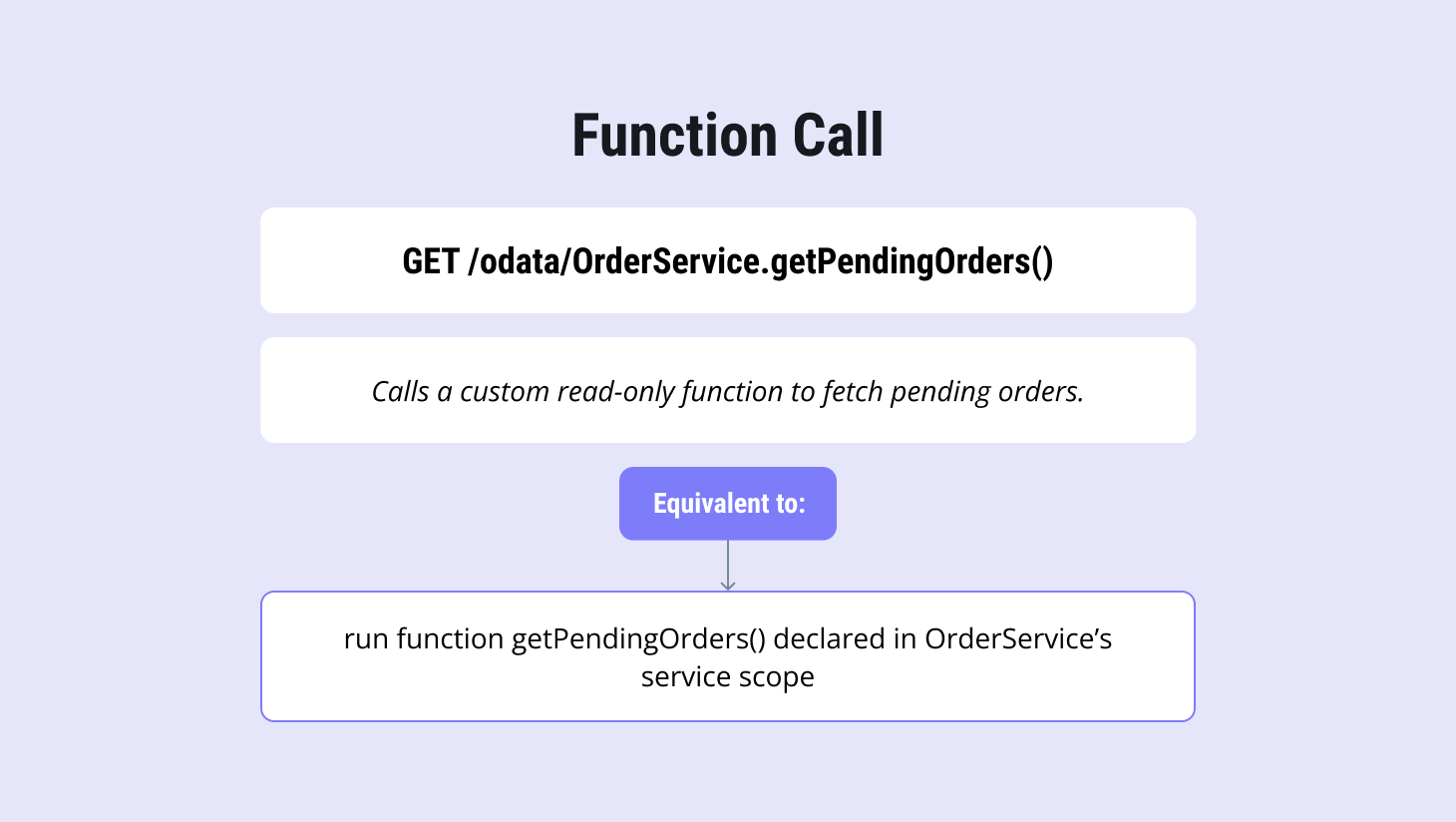
Functional call
A function represents custom logic defined at the service or entity level and implemented in the application when behavior can’t be expressed through standard CRUD or resource-based APIs. By protocol, they are used for read-only operations, optimized for performance, and suitable for complex queries and calculations.
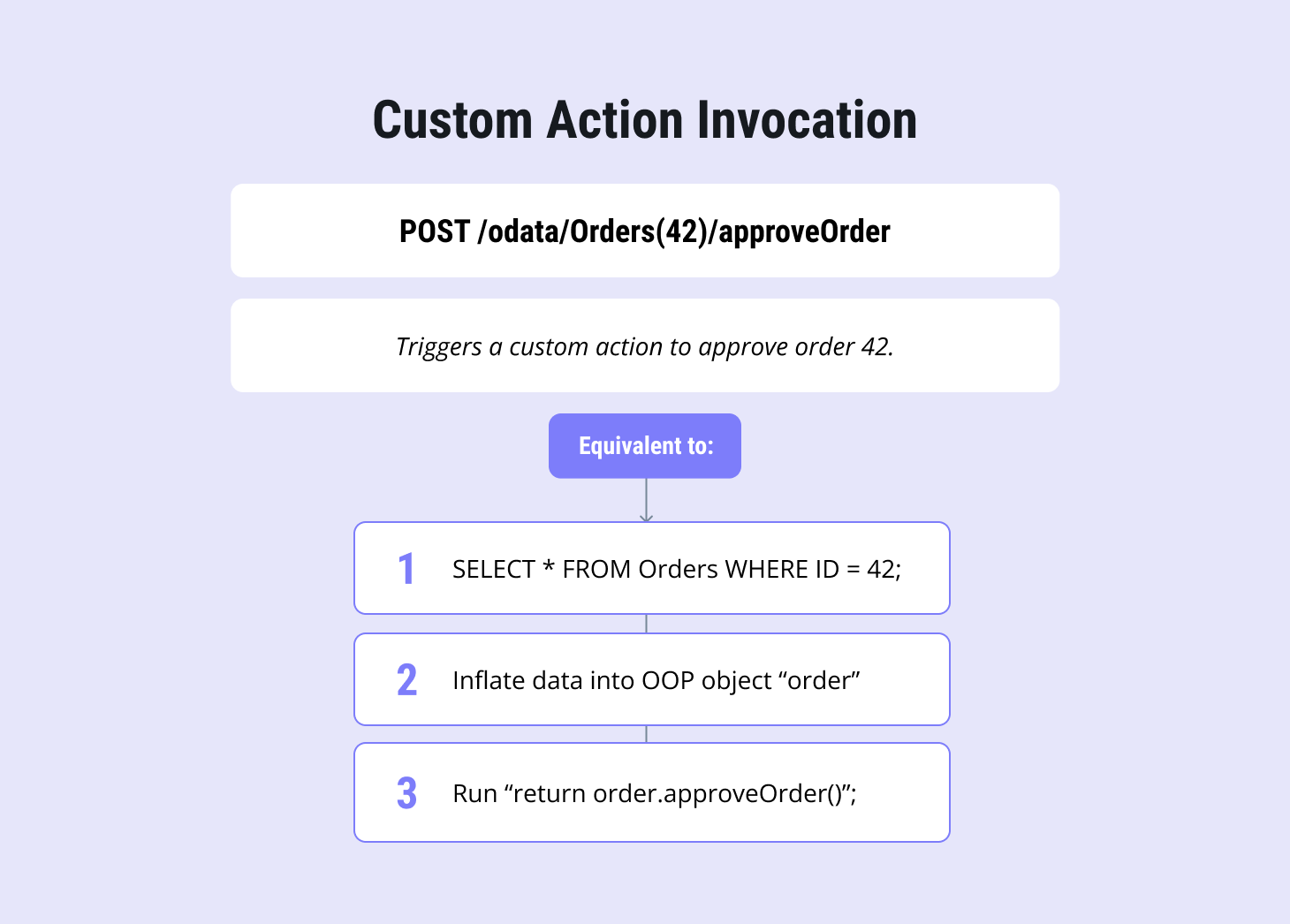
Custom action invocation
In contrast to functions, actions should be used for operations that modify the system state, handle side effects, and require transaction management.
Actions and functions can be executed explicitly on a specific resource instance by its ID, as shown in this request.
Now let’s move on to the CAP framework itself.
Introduction to the SAP CAP Framework
As already mentioned, the SAP Cloud Application Programming (CAP) framework is, at its core, built around CDS. This is where you define both your data model and your service contracts. From these definitions, CAP automatically generates the runtime logic, APIs, metadata, and database access layers.
Conceptually, CDS brings together ideas that usually live in separate places:
-
the structure of SQL data models
-
the clarity of API specifications
-
the schema-driven thinking familiar from GraphQL
All of this is expressed in a single, consistent model. If needed, these definitions can also be exposed as OpenAPI, making integration with non-SAP systems straightforward.
Below is a simple example of a CDS entity taken from an SAP application. It represents a core business object and is therefore considered stable.
As shown below, a CDS service exposes the entity. At the service level, the entity can be understood as a view, in traditional SQL terms. This is where CAP turns your data model into a consumable API.
Together, they allow you to start a fully REST-compatible, enterprise-ready application with minimal effort. Let’s now talk about runtime.
Runtime and Extension Model
CAP supports both Java and Node.js runtimes. Since I'm a Java developer, I focus on the Java runtime, which is built on top of Spring Boot. Handlers play a key role here. They act like aspects, allowing you to extend CRUD logic using before, on, and after hooks.
Typical use cases for handlers include:
-
validation
-
security checks
-
enrichment
-
virtual fields
-
custom business logic
For example, this is a typical SAP handler that uses a before hook. It runs before a CREATE CRUD operation and validates the email field.
When you put everything together, a single CDS entity and a single CDS service effectively replace a large amount of traditional infrastructure: controllers, repositories, DTOs, mappers, validation layers, error handling, batching, and even parts of API documentation.
With minimal setup, a CAP service built from one CDS entity and one CDS service already provides a production-ready API out of the box. From day one, it supports:
-
PATCH/PUT/POST/DELETE semantics out of the box (+ $batch)
-
Filtering ($filter), sorting ($orderby), pagination ($top, $skip, $count)
-
Expansions & joins ($expand), field projection ($select)
-
Search/text filters
-
Server‑driven paging ($skiptoken)
-
AuthZ rules (role checks via @requires, capability annotations)
-
AuthN integration (XSUAA / BTP; local dev auth)
-
Machine‑readable service metadata ($metadata EDMX)
-
OpenAPI spec generation from CDS (for non‑OData consumers)
-
Best practices: optimistic locking, ETag, concurrency control
-
Development features: basic authentication, SQLite/H2
If you are already developing with this framework, you get access to a mature tooling ecosystem. CAP provides plugins for IntelliJ IDEA and VS Code, CDS Maven and CDS Lint (ESLint plugin), and comprehensive official guides and SAP CAP best practices from SAP. In addition, CAP is well supported by modern LLMs, which makes it easy to accelerate SAP CAP development using tools like ChatGPT or SAP AI services .
Here is an example of how quickly a production-ready API can be built and extended using CAP and OData.
How to Build REST APIs with SAP CAP and OData?
Let’s create a new SAP CAP project using IntelliJ IDEA. First, we create an empty project and initialize it via the terminal. For that, the SAP CDS SDK must be installed. Once installed, we run the CDS initialization command with the Java flag, so the project is generated as a Java-based CAP application rather than Node.js.
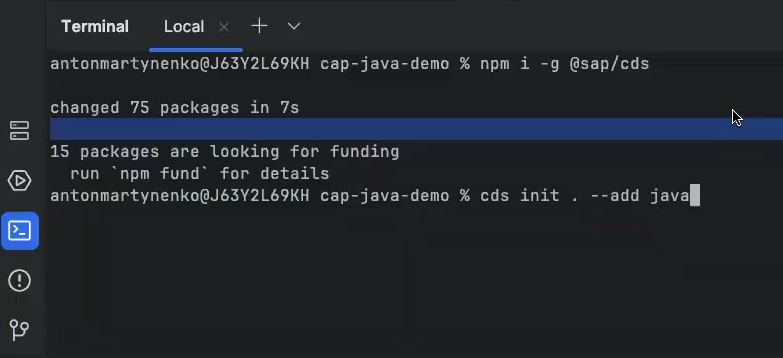
After initialization, the project structure is created automatically. The result is a Maven-based, Spring Boot–powered application, which we can easily import as a Maven project to simplify further work.
Next, we create the database schema. This is done by creating a CDS file schema.cds in the db package.
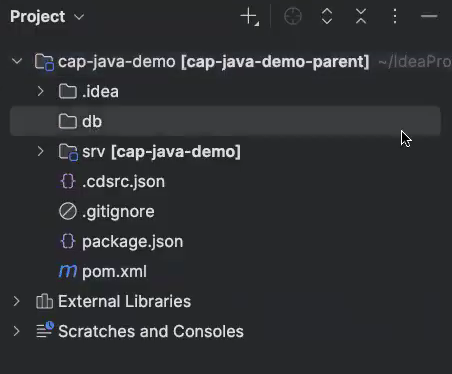
In our example, the schema contains two entities: Department and Employee, linked by an association.
We define a namespace, specify primary keys, and add basic fields such as names and email. The syntax is straightforward and familiar to anyone with SQL experience.
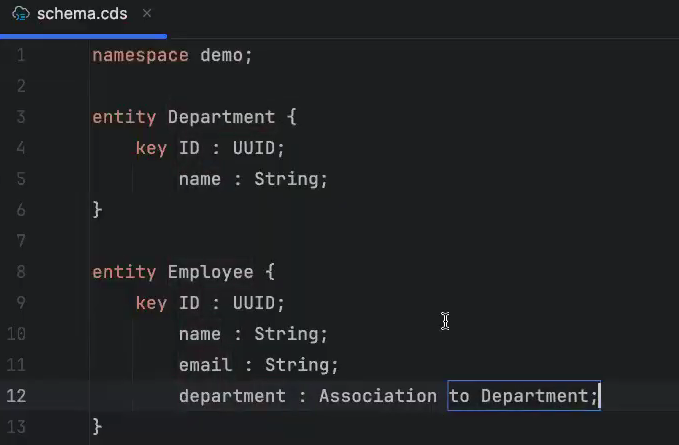
Once the schema is ready, we need to expose it through a service. For that, we create a CDS service definition employee-service.cds in the srv package. The service imports the database schema and exposes projections for the entities we want to make available via the API.
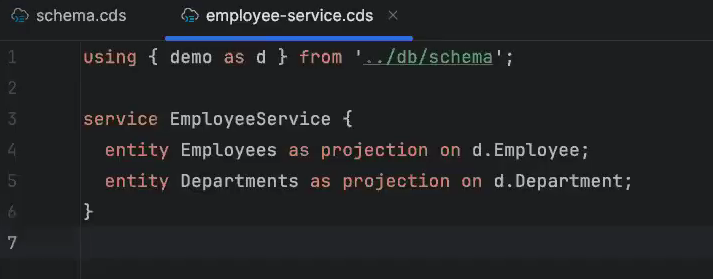
At this point, we already have everything needed to start the application. We build the project using Maven, which generates the necessary Java classes and prepares the Spring Boot application. After that, we run the application and verify that it starts successfully.
A simple request to the service confirms that the API is running, even though the database is still empty.
We can also inspect the service metadata by calling the $metadata endpoint. 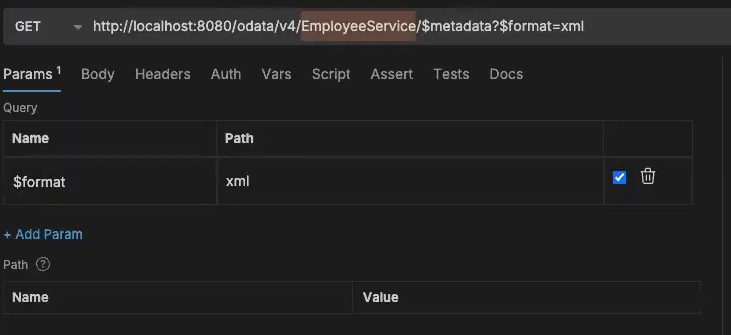
This metadata describes the full service contract and is all a client needs to understand how to interact with the API. At this stage, the application is already stable and usable.
Let's add some testing data.
First, we stop the application. To add this data, you need to run another CDS query.
This creates a new database package containing two empty CSV files, which we’ll populate with data.
Instead of filling them manually, we use an AI-assisted approach inside IntelliJ to generate sample data based on the CDS schema.
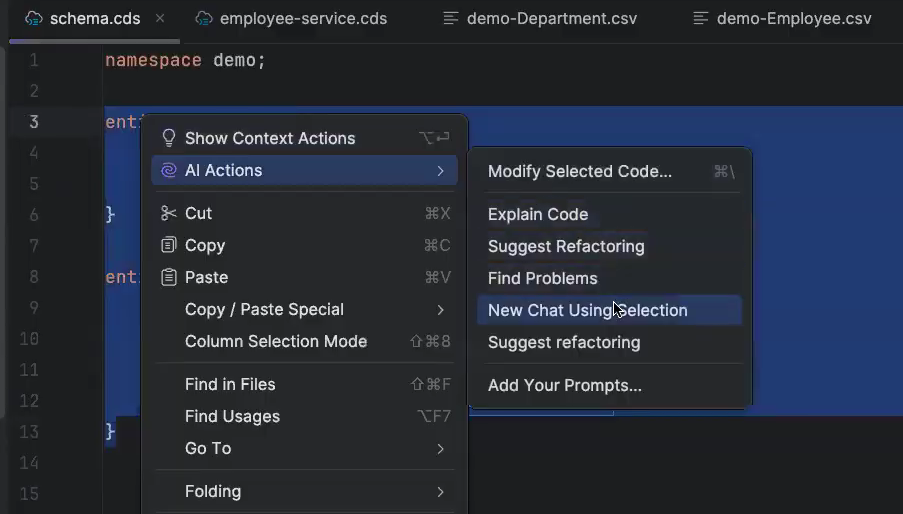
I recommend Claude here because it's probably the best with CAP framework, but ChartGPT4 is good enough too. And I will use a prompt, which is asking for the generation of CSV data based on this schema, and restricting Cloud not to create something not compatible with our system. Nothing special. Here are the test data generated:
The departments and employees are now generated, so we can replace the data file and restart the application. That’s all we need at this stage.
After restarting, the test data appears immediately when we query the API. If we fetch employees again, we now get the full dataset, including their associated departments.
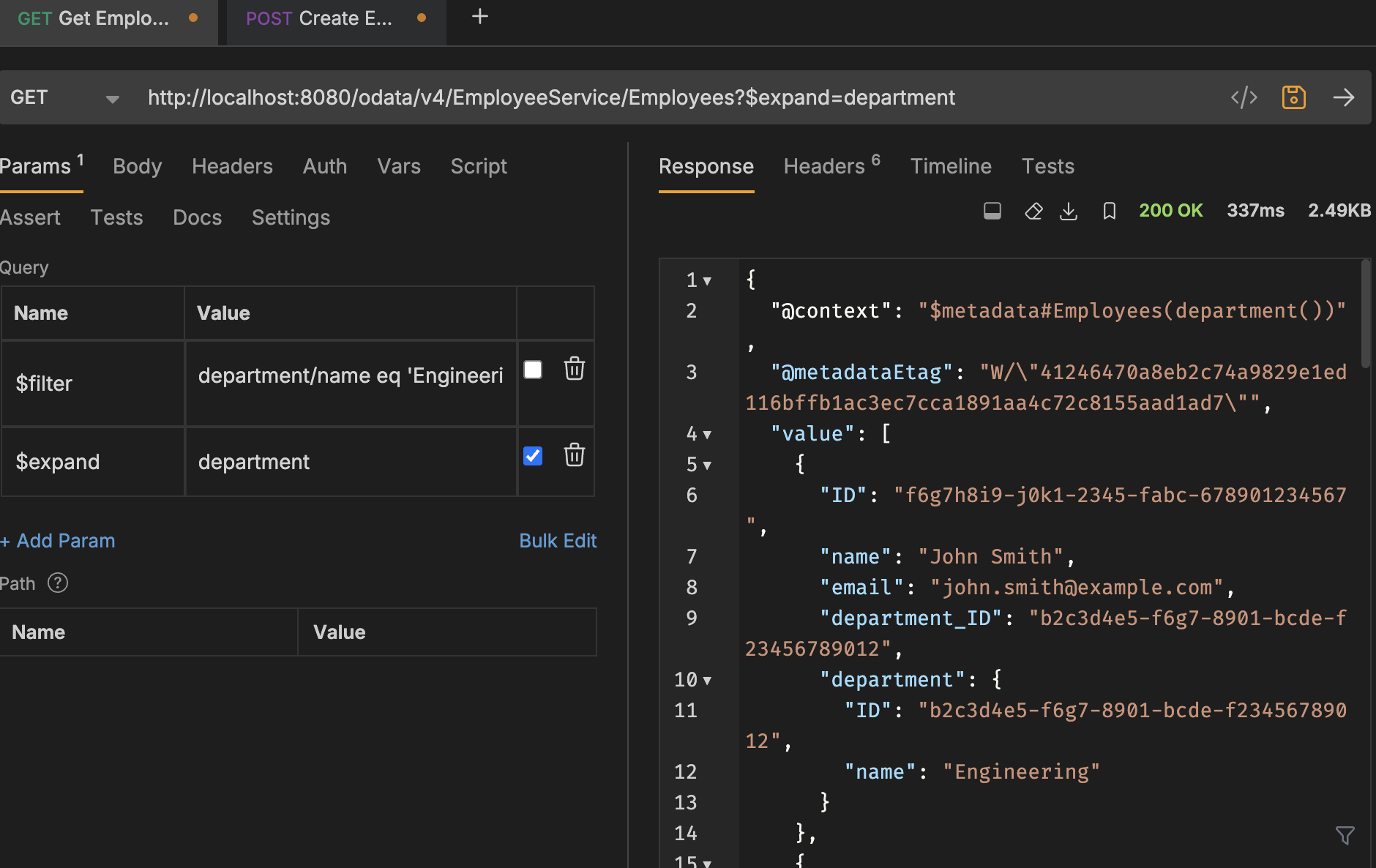
We can expand departments directly in the same response payload by adding a simple $expand to the URL. The department data is returned inline, without any extra requests.
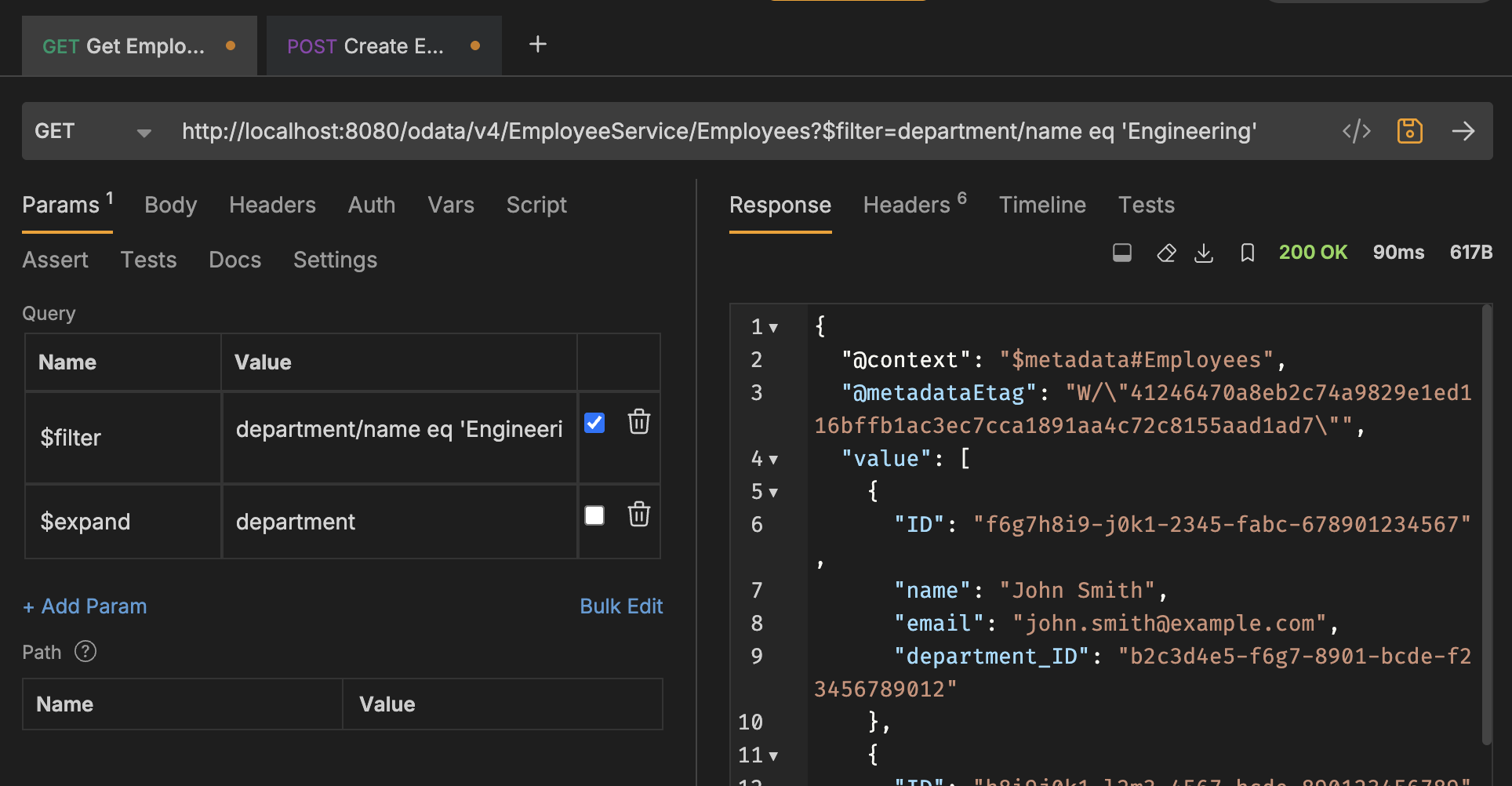
We can also filter by department while keeping the expansion. For example, adding a filter for department/name eq 'Engineering' returns only employees from that department. The query remains readable and intuitive.
The same applies to departments themselves. We can fetch all departments, or request a single one by adjusting the URL. The structure closely resembles how we navigate objects in Java, so the behavior should feel familiar to most developers.
At this point, the database and application are set up, so we can create a new employee. We send a POST request with a name and email, and the record is created successfully.
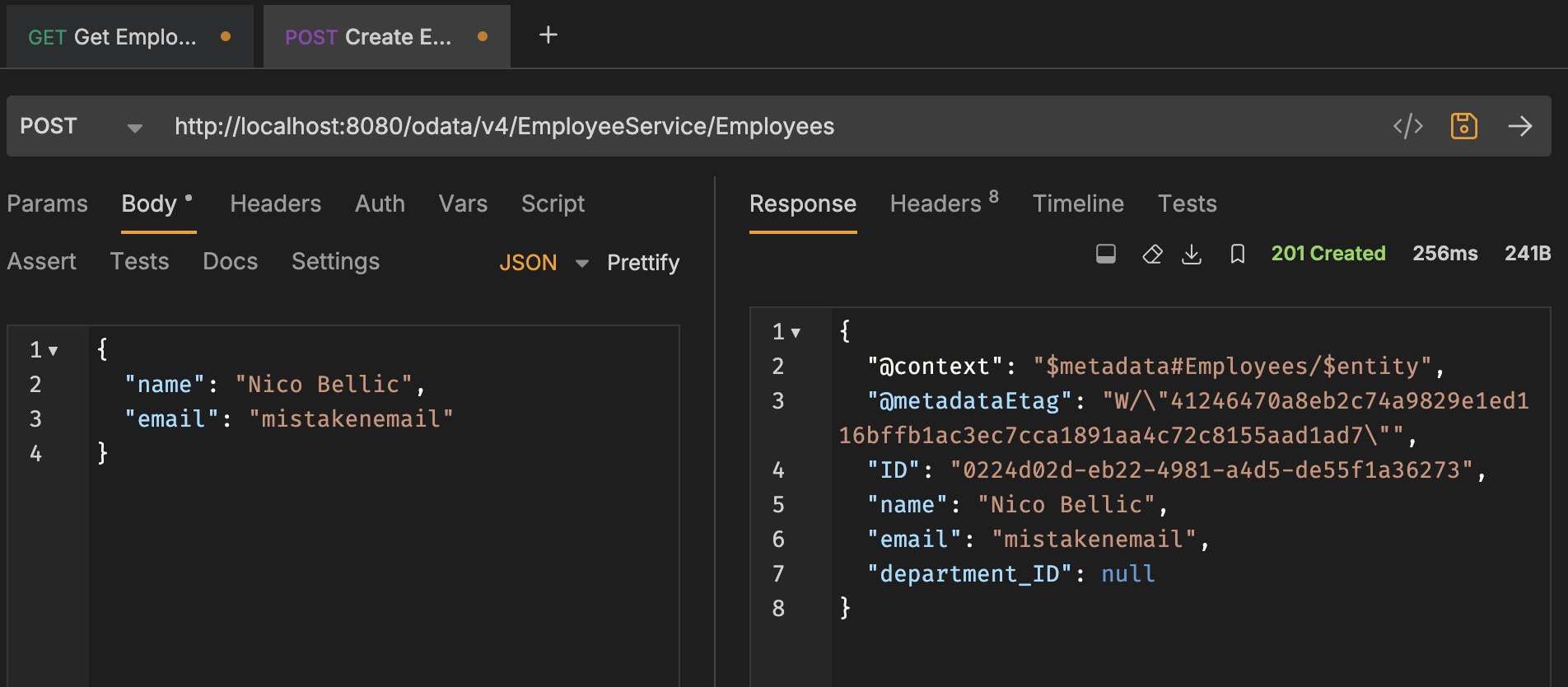
However, the email is stored without any validation. That’s a problem is that we don’t want invalid data polluting the database. CAP doesn’t enforce this validation by default, so we need to extend the application logic.
To do that, we’ll add a new handlers package. Since this is a standard boilerplate, there’s no reason to write it from scratch. I’ll ask Claude to generate it for me.
Inside the handler, we implement simple email validation logic. If the validation fails, we throw a service exception, which results in a proper error response for the client.
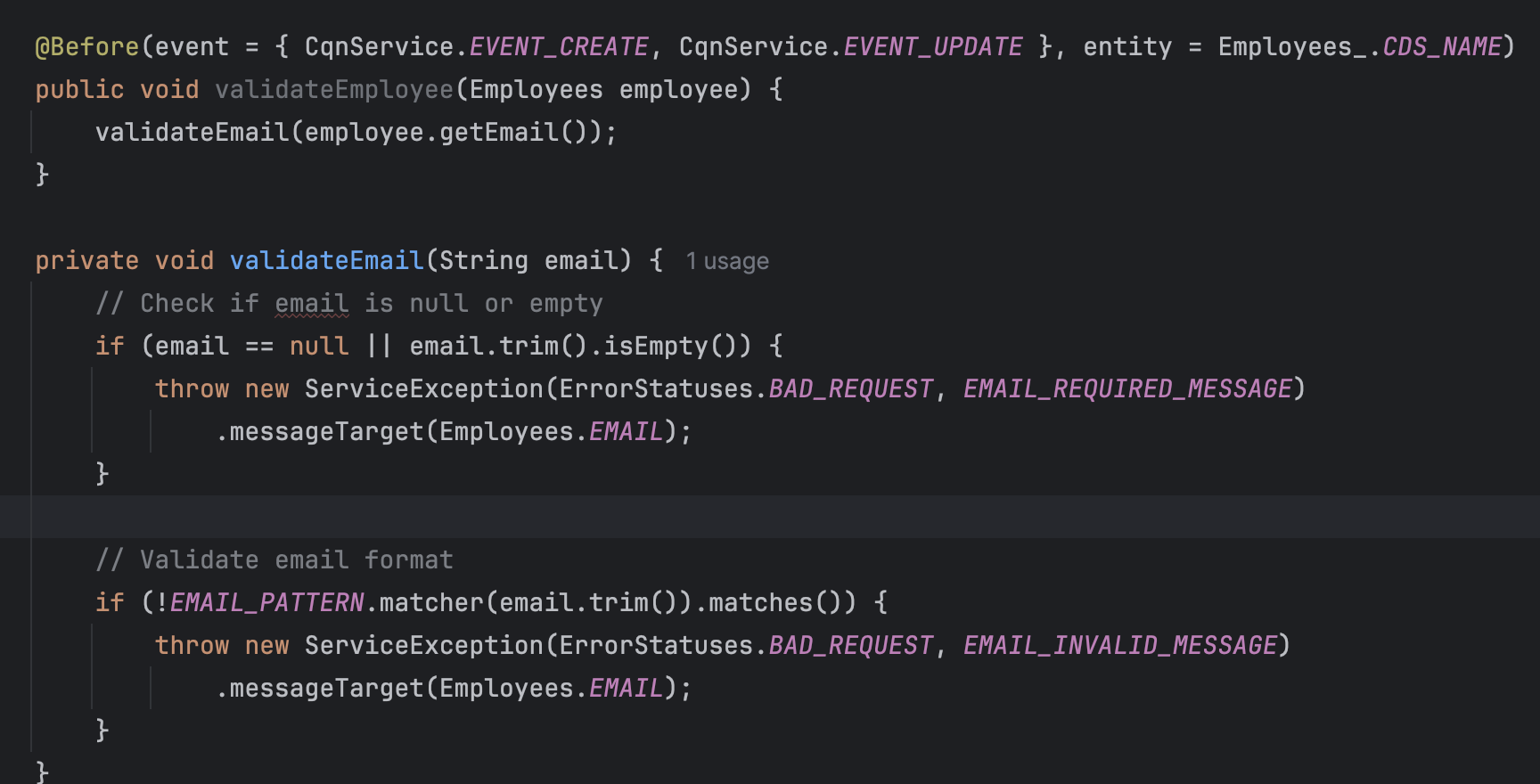
After restarting the application, we test the same request again. This time, invalid data is rejected, and the response clearly indicates what went wrong. With minimal effort, we’ve extended the default behavior and improved data quality without rewriting the core API.
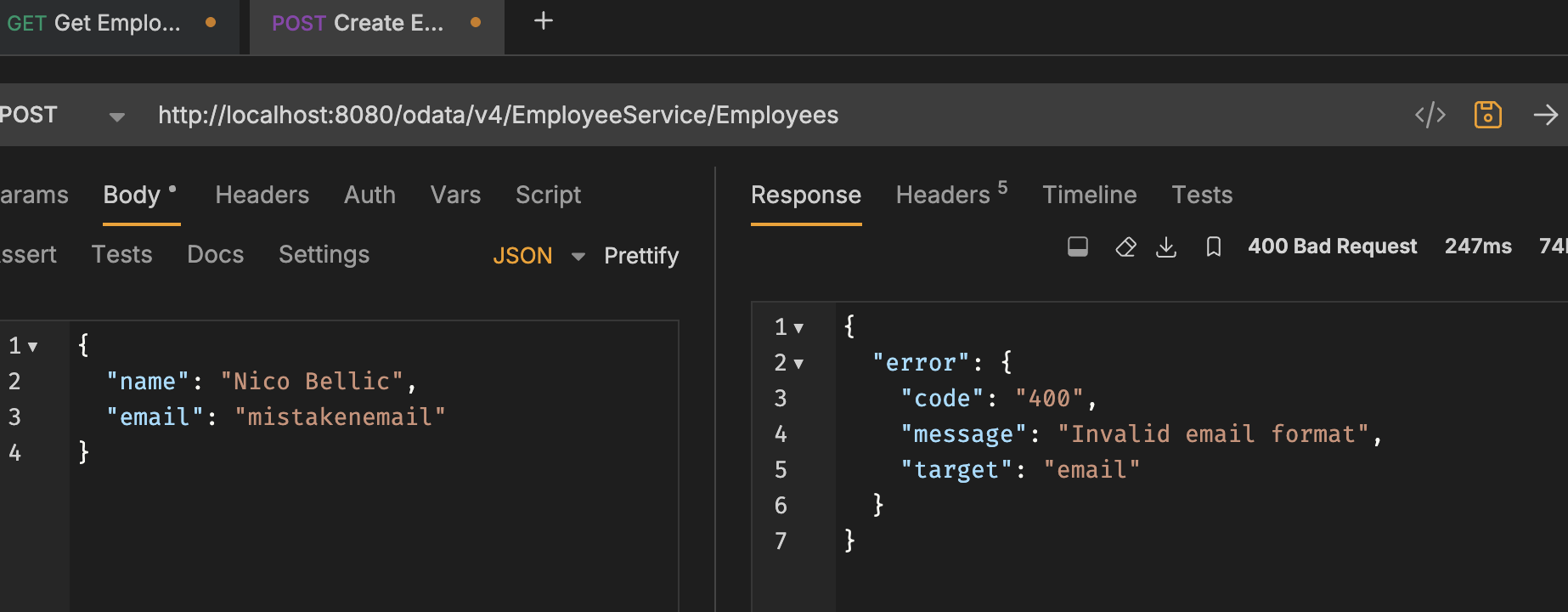
This is how we extended the application. It now validates data more reliably, preventing incorrect input, and is ready for deployment to a real environment.
Conclusion
In short, SAP CAP gives you a lot out of the box, but it works best when you stay within its abstraction level. If your use case requires deep, low-level control, or very lightweight, non–data-centric microservices, it may feel like overkill. OData is powerful, even if it looks unusual at first, especially if you’re used to JSON-RPC or simpler REST styles.
That said, SAP isn’t going away. If you work in an enterprise environment, you will likely encounter it sooner or later. So when you see SAP CAP or OData in a project, don’t treat it as a problem. It’s just a design choice, with clear trade-offs. Once you understand those trade-offs, SAP Cloud Application Programming Model (CAP) becomes another tool you can work with confidently, not something to be afraid of.
Frequently Asked Questions
Does SAP CAP support SQLite for local development?
Yes. SAP CAP fully supports SQLite and H2 as development databases. SQLite is the default option, so you can run CAP applications locally without any additional configuration. This makes local setup fast and frictionless for developers.
What are the disadvantages of OData?
The main drawback of OData is verbosity. Compared to RPC, SOAP, simpler REST styles or GraphQL, OData payloads and URLs can be heavy. This becomes especially noticeable in event-driven architectures, streaming scenarios, or mobile applications, where bandwidth, memory usage, and CPU consumption matter.
OData is a self-describing protocol. Even if you need two fields, the response often contains metadata such as@odata.context, @odata.type, @odata.count, links (e.g., @odata.nextLink) and so on.
That increases payload size. While this is acceptable for enterprise systems, it can be inefficient for mobile or highly bandwidth-sensitive use cases. The protocol's flexibility comes at the cost of long, complex URLs that require a sophisticated client.
GraphQL vs. OData: When should we use GraphQL?
GraphQL is often a better choice when bandwidth optimization is critical (mobile clients), or clients need very fine-grained control over response shapes, or the system is event-driven or highly decoupled.
OData, on the other hand, works best for enterprise, data-centric applications where consistency, standardization, and tooling support matter more than extreme flexibility.
Are there scenarios SAP CAP does not handle well?
One of the most common pain points is the use of actions and functions with binary streams and files. For example, you might want to load a large volume of data from an Excel file using an action, or, conversely, get a CSV representation of an object from a function. Currently, this isn't directly supported.
As a result, you're left with a choice. You can either split the API into two operations by first uploading the data to the database, which requires defining an entity, and then processing it by ID. Or, take a different route and implement a custom Spring controller.
Overall, the trend is that the further away from structured data, the less convenient CAP is.
How do SAP CAP handlers work if they live in a different folder?
CAP extends the Spring Boot model. Generated code is placed in a dedicated gen folder, while custom logic (including handlers) lives alongside the main application code.
At runtime, CAP automatically resolves and wires generated interfaces with custom implementations using annotations and internal framework mechanisms. While this structure may look unusual at first, it is intentional and fully supported by the framework.
Is it acceptable to use AI for projects?
It depends on project and company policies. In most cases, using AI for: test data generation, mock data, boilerplate or scaffolding code are acceptable. However, using AI for business logic or sensitive data should be handled with caution and explicit approval.
For examples, some SAP environments already integrate AI with strict security controls, but teams should always align with their project manager and security guidelines.
Is there documentation for setting up CAP with IntelliJ IDEA and Maven?
Yes. SAP provides official documentation and guides for setting up CAP projects with IntelliJ IDEA, Maven, and Java. These resources can be shared separately and are usually sufficient to reproduce a working local environment.
Can after/before handlers be used to reduce OData verbosity?
Technically, yes, but not in terms of data structure, and they should not be used for that purpose. Overwriting responses in handlers defeats the core idea of OData, where clients explicitly define what they want via query options ($select, $expand, $filter).
If payload size is a concern, it’s better to design queries carefully rather than manipulate responses in handlers.
How does schema evolution work in SAP CAP?
To put it very simply, schema evolution is handled by the HDI container, based on the delta detected between the previous and current version of the schema in the CDS definitions (or, more precisely, in the artifacts that are generated based on them).
This topic is broad and typically requires a dedicated discussion or documentation.
Share this article


.png)
.png)
.png)
.png)
%20(1).jpg)